
Facebook Marketplace alerts, straight into Discord.
If your flipping already runs through Discord, your Marketplace deals should land there too: one channel, instant pings, and everything you need to decide in the alert.
Why Discord works for Marketplace flipping
- It's already open. If you run retail monitors, a bot like Stellar or Refract, or belong to a cook group, Discord is the app you watch during drops.
- Channels keep things organized. A dedicated deals channel keeps a searchable history of every listing you were sent, apart from your other servers and chats.
- Your team can share it. Buying with a partner? You both see the same alert at the same time.
- It works on every device. Desktop, phone, and web, with notifications you can tune per channel.
What a useful alert should contain
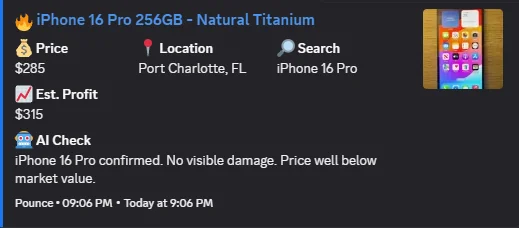
An alert is only fast if you can decide without opening five tabs. A Pounce Discord alert includes:
- The listing title, price, and location, with a direct link to the listing
- Which of your searches matched it
- Estimated resale, estimated profit, and ROI when pricing is available
- An AI check summarizing what the listing actually is and anything the seller disclosed
Profit figures are estimates based on the listing price and available resale data, not completed sales.
Setting it up with Pounce
- Create a deals channel in a server you control, for example #marketplace-deals.
- Create a webhook for that channel in Discord (channel settings, Integrations, Webhooks). You need permission to manage webhooks. Keep the webhook URL private: anyone with it can post to the channel.
- Paste the webhook URL into Pounce's Discord settings and enable Discord notifications.
- Send a test notification. Scanning with a muted or misrouted channel still leaves you late. Test before you rely on it.
- Tune Discord's notifications. Set the deals channel to notify on all messages, and allow Discord notifications on your phone.
- Optionally switch on Auto-message for searches where speed matters most. The seller gets an opener while you're reading the alert. How Auto-message works.
The full walkthrough is in the Docs notification setup.
Keeping the feed worth watching
A channel that fires constantly gets muted, and then it's useless. Keep it tight:
- Use realistic buy targets so only listings with room to move get through.
- Keep your pickup radius to places you'd actually drive.
- Leave junk and scam filtering on. It drops cases, accessories, “ISO” posts, broken units, and wrong variants.
- Check Search History when an alert seems missing. Here's how to diagnose it.
Common questions
Can Facebook send Marketplace notifications to Discord?
Not directly. Facebook's saved-search notifications go to the Facebook app. To get Marketplace listings in Discord you need a tool that watches your searches and posts matches to a Discord webhook or bot.
Where do Pounce deal alerts go in Discord?
To the channel whose webhook you add in Pounce's settings. Most people use a dedicated deals channel with notifications set to all messages, so a ping always means a real candidate.
Do I need to host a Discord bot?
No. Pounce posts through a Discord webhook, which you create in the channel's settings in a few clicks. Nothing else needs hosting beyond Pounce running on your Windows PC.
Does Pounce support Telegram too?
Yes. Alerts can go to Discord, Telegram, or Windows notifications.